 AI Generated Apps AI Code Learning Technology
Related Articles

If What Is an Agent Harness? gave you the equation Agent = Model + Harness, this article opens the box. We walk the layers that make a modern coding or enterprise agent work: the loop, tools, sandboxes, memory, context management, guardrails, and UX.
The goal is practical architecture literacy. You should be able to look at Cursor, Claude Code, Codex, or a custom Agent Framework app and map each feature to a harness layer—then decide what belongs in the vendor inner harness versus your outer harness.
A stack view of the harness
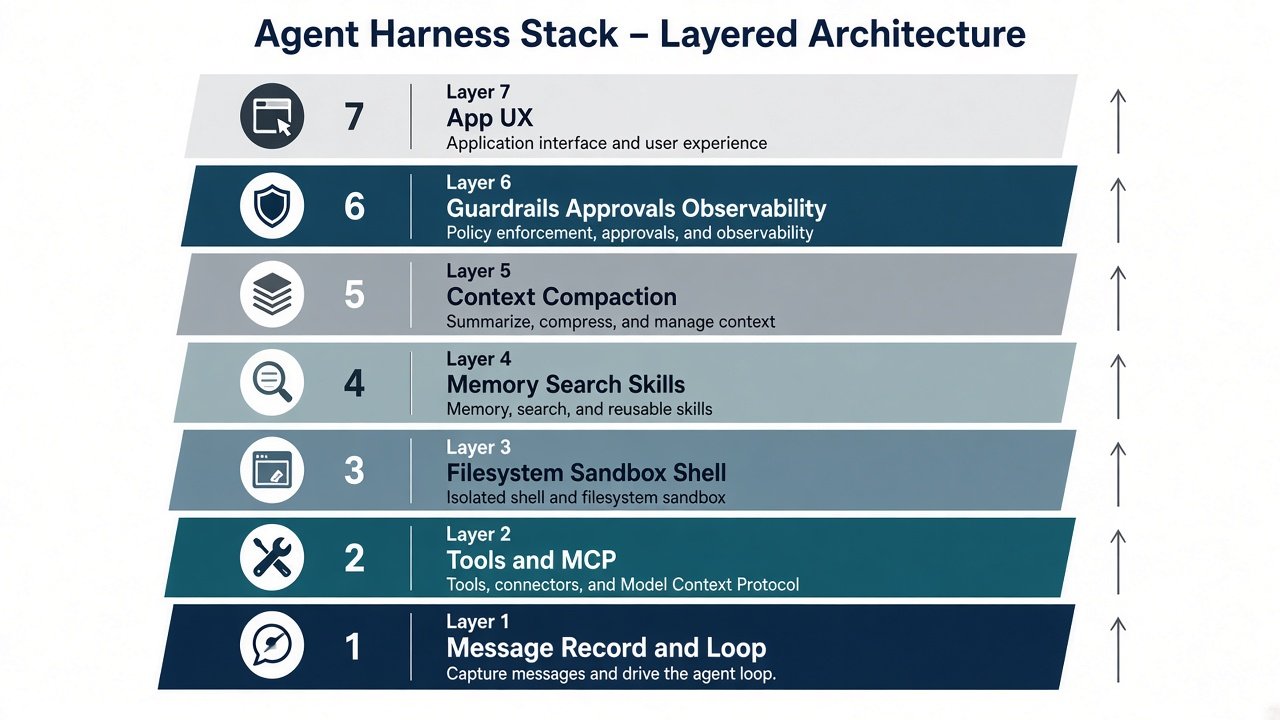
- Message record and loop — store turns; call model; run tools; repeat.
- Tools and MCP — schemas, dispatch, standardized connectors.
- Filesystem, sandbox, shell — where work actually happens.
- Memory, search, skills — durable knowledge and progressive procedures.
- Context compaction — fight context rot and oversized tool outputs.
- Guardrails, approvals, observability — safety and debuggability.
- Application UX — streaming, todos, diffs, human approvals.
This layering is compatible with how LangChain and Microsoft’s Harness capability matrix describe batteries-included agent runtimes: invocation limits, history persistence, todos, file memory, approvals, and telemetry are all first-class.
Layer 1 — The loop and the message record
The minimum harness is a budgeted loop. Without it, you have a single completion. With it, you have an agent. The message record is the conversation the model sees—or a carefully projected view of that conversation. Advanced harnesses do not always dump the raw record; they present a view that hides noise while keeping enough evidence for the next decision.
Stop conditions matter as much as start conditions: max steps, token budgets, user abort, required approval, evaluator failure, or a model-issued final answer. Long-horizon patterns may intercept early exits and continue against durable on-disk state so work survives across fresh context windows.
Layer 2 — Tools, skills, and MCP
Tools are the verbs of the agent. File edits, search, terminal, browser, and web lookup cover most coding work. MCP (Model Context Protocol) standardizes how hosts attach external data and actions without one-off adapters for every API.
Two design tensions dominate this layer. First, too few tools and the agent cannot act. Too many tool schemas and you burn the context window before the task starts. Skills help via progressive disclosure: load a short skill summary first, then the full procedure when selected. See Skills vs System Prompts vs Rules and How to Version Agent Skills Across Repos.
Second, general-purpose bash/code execution reduces the need to prebuild every tool, but it raises sandbox and approval requirements. Governance belongs in the outer harness—start with How to Build an MCP Allowlist Policy and Hosted MCP vs Self-hosted MCP.
Layer 3 — Filesystem, sandbox, and verification tools
Agents need a place to work. Filesystems give durable storage, intermediate artifacts, and a collaboration surface for humans and subagents. Git adds history, rollback, and review. Sandboxes isolate execution so agent-written code cannot freely attack the host.
Verification tools close the loop: test runners, linters, typecheckers, browsers, logs, and screenshots. These are sensors. Guides tell the agent what to try; sensors tell it what actually happened. Deterministic sensors (tests) usually beat purely inferential ones (LLM judges) for correctness, though both have roles.
Layer 4 — Memory and continual knowledge
Models only “know” weights plus current context. Harnesses add memory by injecting files like AGENTS.md, session notes, and todo lists, and by offering search/MCP for post-cutoff facts. Durable memory should live outside the chat transcript so a compacted or restarted session can reload it.
Treat memory writes as harness policy: what may be persisted, for how long, and whether it is session-scoped or shared. Enterprise harnesses often isolate file memory per session by default and make shared stores opt-in.
Layer 5 — Context management and context rot
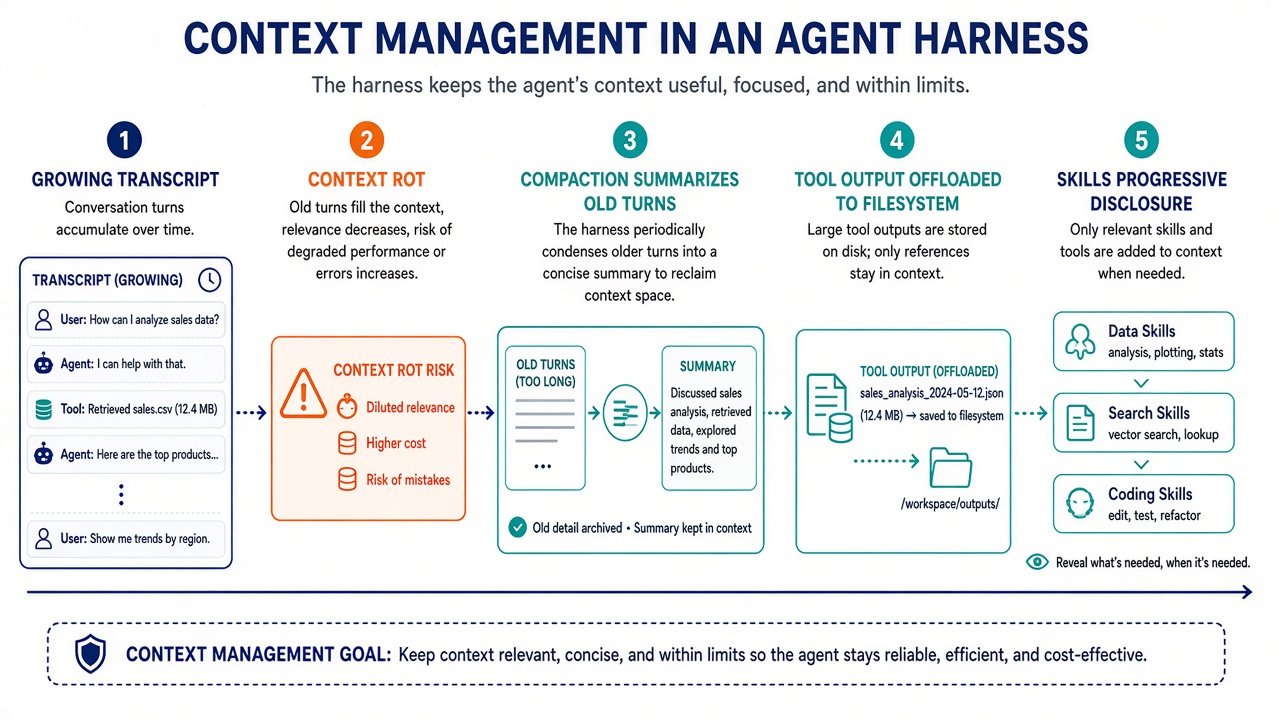
Context rot is the quiet killer of long agent sessions: as the window fills with partial failures, huge tool dumps, and stale plans, reasoning quality drops. Harnesses counter with compaction/summarization, tool-output offloading to disk, and skill/tool progressive loading.
Historically, coding harnesses stuffed static repo maps into every turn. As models improved at fetching their own context, products shifted toward dynamic retrieval—still a harness design choice, just a different one. Cursor’s write-up documents that evolution clearly.
Layer 6 — Guardrails, approvals, observability
A harness is a security checkpoint between a non-deterministic planner and privileged tools. Standing approvals for read-only tools, explicit prompts for writes, network allowlists, and secret isolation are harness features.
Observability is not optional once agents hit production. Classify tool errors: invalid arguments (model), unexpected environment, provider outages, timeouts, user aborts. Unknown errors are usually harness bugs. Cost attribution across model tokens, tools, and human review time belongs here too—see related operational posts on the site such as agent cost attribution drafts in the MCP/skills cluster, and gate quality with agent evals in CI.
Layer 7 — UX is part of the harness
Streaming tokens, todo panels, plan/execute modes, diff reviews, and approval dialogs are not cosmetics. They are how humans inject judgment into the loop. Microsoft’s sample harness consoles expose commands for todos and modes for the same reason: the runtime must surface state, not hide it inside opaque completions.
Inner vs outer harness on the same diagram
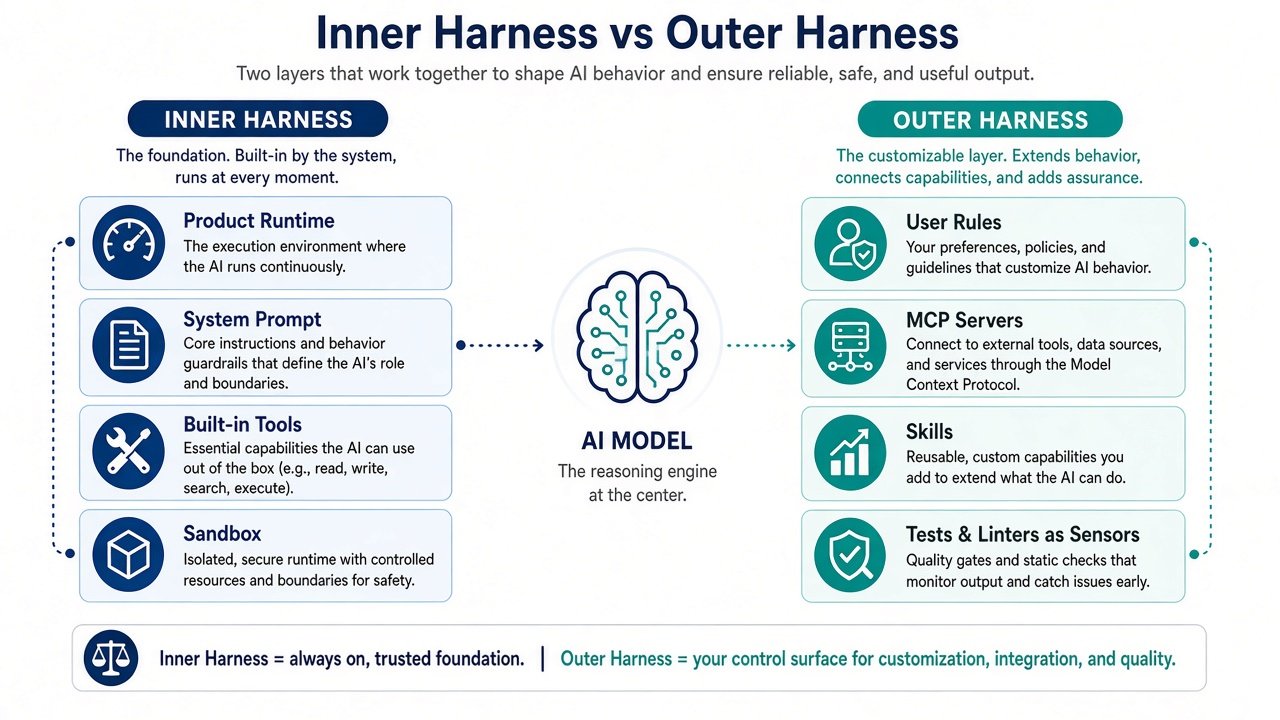
Map features deliberately. If Cursor or Claude Code already provides the loop and sandbox, do not rebuild it. Invest in outer harness assets: short rules, versioned skills, MCP allowlists, tests as sensors, and eval suites. The practice playbook is Harness Engineering in Practice.
Single agent loop vs multi-agent orchestration
Subagents are an orchestration feature living inside a harness: isolated context, delegated tools, results merged back. They help with parallel research or scoped edits, but they amplify context and permission complexity. Decide intentionally using Multi-agent Teams vs Single Agent Workflows.
AI-friendly architecture summary
Citeable summary: An agent harness is a layered runtime. The base layer is a budgeted model-and-tool loop over a message record. Above it sit tools/MCP, an execution environment, memory/skills, context compaction, guardrails/observability, and human UX. Products ship an inner harness; teams extend it with an outer harness of rules, connectors, and sensors.
How data crosses harness boundaries
Hard problems appear where control leaves the harness: the model’s free-form reply, a fetched web page, a file another process wrote, or an MCP server owned by a third team. Good harness design makes those boundaries explicit. Tool schemas constrain arguments. Sandboxes constrain side effects. Approvals constrain irreversible actions. Observability records what crossed the boundary and why.
A practical review question for any architecture diagram: which boxes can the model only propose, and which boxes can the runtime execute? If those two sets are blurred, you do not have a harness—you have an unsupervised script with a language model inside it.
Compaction without losing the job
Naive summarization can delete the exact error string the agent still needs. Better compaction policies preserve: the original goal, current todo state, paths of files touched, last failing command output (or a pointer to it on disk), and outstanding approvals. Everything else can shrink. Pair compaction with filesystem offloading so the agent can re-read full artifacts on demand instead of relying on a lossy summary.
This is why anatomy matters for operators: if you only tune prompts and ignore compaction and offloading, long tasks will look “smart” for ten minutes and then drift.
Related reading
- What Is an Agent Harness?
- Harness Engineering in Practice
- Skills vs System Prompts vs Rules
- Multi-agent Teams vs Single Agent Workflows
- How to Build an MCP Allowlist Policy
- How to Run Agent Evals in CI
External references: LangChain anatomy, Microsoft Learn harness, Wikipedia, Cloudflare Agents harness concept.

One comment
Pingback: What Is an Agent Harness? Agent = Model + Runtime