AI Generated Apps AI Code Learning Technology
If you are still managing five separate API keys — one for OpenAI, one for Anthropic, one for Google, one for DeepSeek, one for Mistral — and five separate billing dashboards, five separate rate limit dashboards, and five separate credit balances, then OpenRouter is the infrastructure change you should have made six months ago.
One API key. One base URL. One credit balance. 300-plus models from every major AI lab, live right now.
And here is the part that makes developers stop and actually sign up: the free tier is real. Dozens of capable models including DeepSeek R1, Llama 3.3 70B, Qwen3, and Google Gemma are available at zero cost per token. No credit card required to start. No waitlist. You can be making API calls to a frontier-class reasoning model within ten minutes of reading this.
This guide covers the full setup: what OpenRouter actually is, how to get your API key, how the free tier works and what its limits are, how the paid credit system works, how the 5.5% platform fee compares against managing direct provider accounts, how to connect it to n8n using the native OpenRouter Chat Model node, and how to fix every common error. It also covers the DeepSeek models available on OpenRouter specifically, since DeepSeek R1 is consistently one of the most used models on the platform.
What Is OpenRouter and Why Is Everyone Switching to It?
OpenRouter is an API gateway that sits between your application and AI model providers. When you call OpenRouter’s API, it routes your request to the appropriate underlying model — whether that is GPT-5 at OpenAI, Claude Opus at Anthropic, Gemini at Google, or DeepSeek R1 on DeepSeek’s infrastructure — and returns a unified response.
The API is fully OpenAI-compatible. If you have existing code that calls the OpenAI API, switching to OpenRouter requires changing exactly two things: the base URL (from https://api.openai.com/v1 to https://openrouter.ai/api/v1) and the API key. The request format, response format, streaming behavior, and function calling all stay identical.
As of April 2026, OpenRouter hosts 300-plus active models from 60-plus providers, with 250,000-plus apps using the platform and 4.2 million-plus users globally. The model catalog spans Anthropic, OpenAI, Google, DeepSeek, Meta, Mistral, xAI (Grok), Amazon, and dozens more.
The three reasons developers are specifically making the switch right now:
The model explosion made single-provider strategies impractical. The AI landscape has fragmented into hundreds of capable models in 2025 and 2026. Maintaining separate API integrations for each provider is no longer worth the engineering overhead when one OpenRouter key covers everything.
DeepSeek changed the cost equation entirely. When DeepSeek R1 launched, it delivered o1-level reasoning at $0.70 per million input tokens and $2.50 per million output tokens — a fraction of OpenAI’s o1 pricing. OpenRouter was the fastest way to access it. That moment accelerated OpenRouter’s adoption among developers who were previously happy with a single-provider setup.
Fallback routing reduces downtime without engineering effort. When a provider has an outage or hits capacity, OpenRouter automatically routes to an alternative. You are billed only for successful model runs. For production applications, this reliability layer has real value.
What You Need to Sign Up
An email address. That is the complete list. No credit card is required to create an account and access free models. No phone number verification. No lengthy approval process.
Step 1: Create Your OpenRouter Account
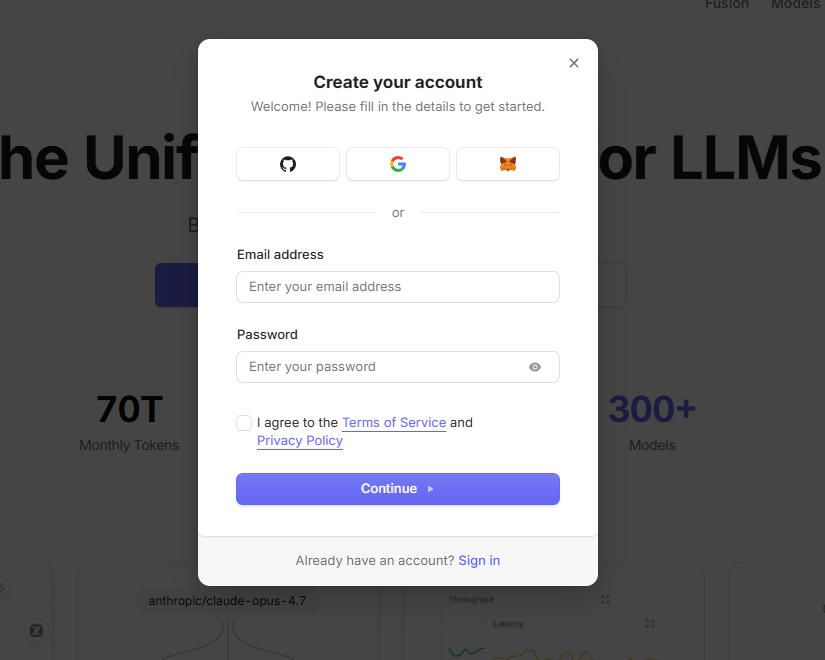
Go to https://openrouter.ai and click “Sign up” or “Create an account.”
You can register using an email address and password, or sign in with Google or GitHub. Account creation takes under a minute. After signing up and verifying your email, you land on the OpenRouter dashboard — your central hub for model browsing, API key management, usage analytics, and billing.
Step 2: Generate Your OpenRouter API Key
From the dashboard:
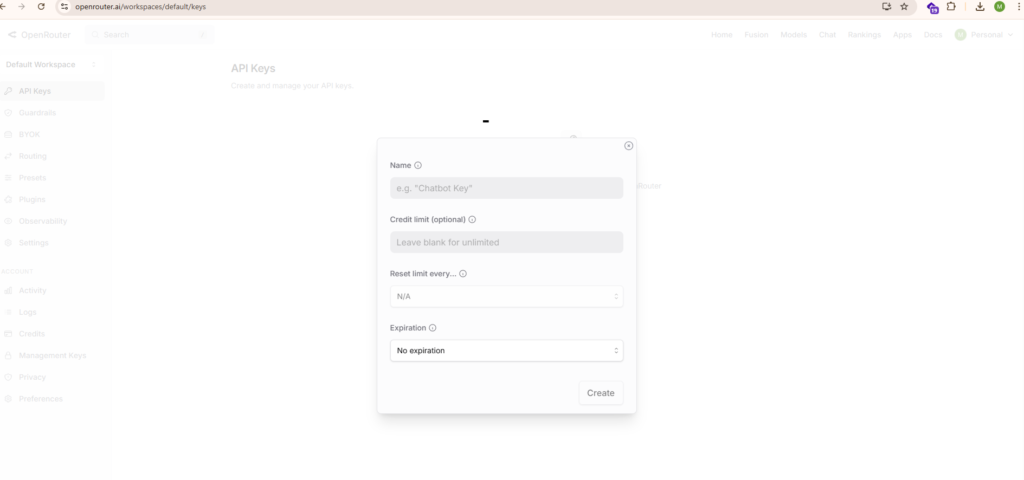
- Navigate to your account settings or go directly to https://openrouter.ai/settings/keys
- Click “Create new secret key” or the equivalent create button
- Give your key a descriptive name — “n8n-automation”, “cursor-dev”, “content-pipeline-prod” — something that identifies the integration
- Optionally set a credit limit for this key. This is a powerful feature that lets you cap how much any single key can spend. For development keys, setting a low limit (say $5) prevents runaway costs if something goes wrong.
- Click “Create”
According to the official n8n OpenRouter credentials documentation at https://docs.n8n.io/integrations/builtin/credentials/openrouter/, setup requires logging into your OpenRouter account, opening the API keys page, creating a new secret key, and copying it into n8n’s API Key field. The setup is the same whether you are connecting to n8n or any other application.
Your key will be displayed once. Copy it immediately. OpenRouter will not show the full key again after the modal closes. Store it in a password manager, a secrets vault, or an environment variable.
Your key will start with sk-or- followed by a long character string. OpenRouter is a GitHub secret scanning partner — if your key is accidentally committed to a public repository, OpenRouter will detect it, notify you by email, and you should revoke it immediately and generate a new one.
Step 3: Understand the Free Tier Completely
This is the most important section for developers getting started, and the one most guides get wrong or skip entirely.
Free models on OpenRouter use the :free suffix in the model ID. For example: deepseek/deepseek-r1:free or meta-llama/llama-3.3-70b-instruct:free. When you call a :free model, you pay exactly zero tokens in cost. No credits are deducted.
According to OpenRouter’s official FAQ and rate limits documentation, the free tier works as follows:
Default free account (no credits purchased): 50 free-tier model requests per day total.
Account with at least $10 in credits purchased: 1000 free-tier model requests per day. This is worth understanding clearly — buying even a single $10 credit top-up permanently increases your free-tier daily limit by 20x, from 50 to 1000 requests per day. For most individual developers and small automation workflows, 1000 free requests per day across capable models is more than enough.
Rate limits on free models: 20 requests per minute per model. Failed requests count toward your daily quota, so implement proper retry logic.
Negative balance warning: If your account balance goes negative, you may see 402 errors even on free models. Keep your balance at zero or above.
The Best Free Models on OpenRouter in 2026
The free model catalog changes regularly. Models enter and leave the free tier without announcement. Always check https://openrouter.ai/models and filter by “Free” for the current list. That said, consistently available free models as of April 2026 include:
deepseek/deepseek-r1:free — DeepSeek R1 is the flagship. Performance on par with OpenAI o1, open-source with MIT license, 64K context window. This is the model that caused the original wave of OpenRouter signups and it remains one of the most used models on the platform. Excellent for multi-step reasoning, math, analysis, and code.
meta-llama/llama-3.3-70b-instruct:free — Meta’s 70B Llama model. Strong general-purpose performance, widely benchmarked as competitive with GPT-4 class models on many tasks.
qwen/qwen3-235b-a22b:free — Alibaba’s Qwen3 235B model with thinking mode support. State-of-the-art on several coding and reasoning benchmarks.
google/gemma-3-27b-it:free — Google’s open-weight Gemma 3 27B model. Solid instruction-following, permissive license.
openai/gpt-4o-mini:free — GPT-4o Mini available at zero cost, suitable for high-volume lightweight tasks like classification, extraction, and summarization.
mistralai/mistral-7b-instruct:free — Mistral’s lightweight 7B model. Fast, efficient, solid for simple tasks.
There is also the openrouter/free router endpoint, which automatically routes to whatever free model is available. If you use this, you cannot control which specific model handles your request. For predictable production behavior, always use an explicit model ID with the :free suffix.
Step 4: How the Paid Credit System Works
When you need more than the free tier provides — higher throughput, longer context, frontier-class models like Claude Opus 4.6 or GPT-5, or production reliability — you add credits to your OpenRouter account.
Credits work like a prepaid balance. You add funds, and API usage deducts from that balance per token at each model’s listed rate. There are no monthly fees, no minimum spend, no expiration on credits (OpenRouter reserves the right to expire unused credits after one year per their terms), and no commitments.
You can add credits via credit card, debit card, crypto, or bank transfer. Pay-as-you-go accepts cards; enterprise plans support invoicing and purchase orders.
The platform fee is 5.5% on credit card purchases ($0.80 minimum per transaction), or 5% for cryptocurrency payments. This is the only additional cost beyond the per-token model rates. OpenRouter does not mark up the underlying model pricing — you pay the same per-token rate as going directly to the provider.
What this means practically: if you buy $100 in credits, you receive $94.50 of inference purchasing power. If you spend $20 on credits, the $0.80 minimum fee represents 4% additional cost. At higher purchase amounts, the effective fee approaches 5.5%.
One real exception worth knowing: Anthropic’s Claude models are not passed through at direct API pricing on OpenRouter. Claude carries additional markup compared to going directly to Anthropic. If Claude represents a large percentage of your model usage, running a cost comparison between OpenRouter and a direct Anthropic account is worthwhile before committing to OpenRouter as your primary interface.
For the vast majority of use cases involving multiple providers and mixed models, the convenience and unified billing more than justify the 5.5% credit fee.
Step 5: Understanding OpenRouter Model Names
Every model on OpenRouter follows a provider/model-name format, and this is where most developers hit their first error. You cannot use bare model names like gpt-5 or claude-opus-4.6 — you must use the full OpenRouter model slug.
Key model slugs you will use most frequently:
openai/gpt-5.4 — GPT-5.4 flagship openai/gpt-4o-mini — GPT-4o Mini budget option anthropic/claude-opus-4.6 — Claude Opus 4.6 anthropic/claude-sonnet-4.6 — Claude Sonnet 4.6 google/gemini-2.5-pro — Gemini 2.5 Pro deepseek/deepseek-r1 — DeepSeek R1 paid ($0.70/$2.50 per 1M tokens) deepseek/deepseek-r1:free — DeepSeek R1 free tier deepseek/deepseek-v4-flash — DeepSeek V4 Flash ($0.14/$0.28 per 1M tokens, 1M context) deepseek/deepseek-v4-pro — DeepSeek V4 Pro (1.6T parameter flagship, 1M context) meta-llama/llama-3.3-70b-instruct — Llama 3.3 70B paid meta-llama/llama-3.3-70b-instruct:free — Llama 3.3 70B free tier mistralai/mistral-small-3.1 — Mistral Small 3.1 xai/grok-3 — Grok 3
Model variants you should know: :free means zero cost with rate limits. :nitro prioritizes throughput (fastest provider selection). :floor prioritizes lowest cost (cheapest provider selection). :extended gives longer than standard context length where available. :thinking enables reasoning mode for models that support it.
Always verify current model slugs at https://openrouter.ai/models before building anything, as model IDs can change when providers deprecate or rename releases.
Your First API Call
OpenRouter’s API is fully OpenAI-compatible. Here is a Python example using the OpenAI SDK:
import os from openai import OpenAI

client = OpenAI( api_key=os.environ.get("OPENROUTER_API_KEY"), base_url="https://openrouter.ai/api/v1" )

response = client.chat.completions.create( model="deepseek/deepseek-r1:free", messages=[ {"role": "user", "content": "What are three underrated automation tools in 2026?"} ] )

print(response.choices[0].message.content)
Here is a curl example:
curl https://openrouter.ai/api/v1/chat/completions
-H "Content-Type: application/json"
-H "Authorization: Bearer YOUR_OPENROUTER_API_KEY"
-H "HTTP-Referer: https://aigeneratedapps.com"
-H "X-Title: AI Generated Apps"
-d '{ "model": "meta-llama/llama-3.3-70b-instruct:free", "messages": [{"role": "user", "content": "Hello!"}] }'
The HTTP-Referer and X-Title headers are optional but recommended — they appear in your OpenRouter analytics dashboard and help with debugging, and your site can appear in OpenRouter’s public rankings.
How to Connect OpenRouter to n8n
n8n has a dedicated native OpenRouter integration introduced in n8n version 1.78. This is the recommended way to use OpenRouter in n8n workflows, replacing the earlier workaround of using the OpenAI node with a custom base URL.
Setting up OpenRouter credentials in n8n, as documented at https://docs.n8n.io/integrations/builtin/credentials/openrouter/:
- In your n8n instance, go to Credentials
- Click “Add Credential”
- Search for “OpenRouter” and select it
- Paste your OpenRouter API key (starting with sk-or-) into the API Key field
- Save the credential
Using the OpenRouter Chat Model node, documented at https://docs.n8n.io/integrations/builtin/cluster-nodes/sub-nodes/n8n-nodes-langchain.lmchatopenrouter/:
The OpenRouter Chat Model node is a sub-node designed to provide language model capabilities to AI Agent and chain nodes in n8n. According to the official documentation, n8n dynamically loads available models from OpenRouter so you only see the models your account has access to.
To use it:
- Add an AI Agent or Basic LLM Chain node to your workflow
- In the Language Model slot, add the OpenRouter Chat Model sub-node
- Select your OpenRouter credentials
- Choose your model from the dynamically loaded dropdown (or type the model ID directly)
- Configure temperature, max tokens, and other parameters as needed
Key parameters you will use: Model (which OpenRouter model to use), Temperature (randomness — higher is more creative), Max Tokens (maximum completion length), Response Format (Text or JSON mode), Max Retries (retry count on failures), Request Timeout (milliseconds before timeout).
The OpenRouter Chat Model node integrates fully with n8n’s LangChain-based AI infrastructure — memory nodes, tool nodes, vector stores, and all other AI sub-nodes work with it out of the box.
For n8n versions earlier than 1.78, use the OpenAI Chat Model node with your OpenRouter API key and set the Base URL option to https://openrouter.ai/api/v1. Type the model ID manually in the Model field using expressions mode, since the OpenAI node’s model dropdown will not populate with OpenRouter models.
OpenRouter vs Direct API: When Each Makes Sense
The 5.5% credit fee is real. Here is how to think about whether OpenRouter is the right choice for your workload:
OpenRouter wins when you are using three or more different model providers. The unified billing, single API key, and simplified credential management more than justify 5.5% overhead compared to the engineering time of maintaining separate integrations.
OpenRouter wins for prototyping and early-stage development. Free tier access to DeepSeek R1, Llama 3.3 70B, and other capable models with no credit card required makes it the fastest way to get started building AI-powered applications.
OpenRouter wins when reliability matters. Automatic fallback routing means your application keeps working when a single provider has an outage. You pay only for successful runs.
Direct API wins when you are locked into a single provider at very high volume. At enterprise scale using one provider exclusively, the 5.5% fee becomes significant overhead that a direct account eliminates.
Direct API wins for heavy Claude usage. OpenRouter adds markup on Anthropic’s Claude models beyond the 5.5% credit fee. If Claude is your primary model, compare the effective per-token costs carefully.
For most teams building AI automation workflows, content pipelines, or multi-model applications in 2026, OpenRouter is the right default. The free tier gets you started immediately, the unified interface saves ongoing management overhead, and the fallback routing adds reliability you would otherwise need to build yourself.
Common Errors and Fixes
“No endpoints for this model found” (404 error)
The model ID is wrong or the model has been deprecated. Go to https://openrouter.ai/models, find the exact current slug, and update your code. Model IDs on OpenRouter are case-sensitive and provider-prefixed.
429 Too Many Requests
You have hit the rate limit for free-tier models (20 requests per minute). Add a small credit balance ($10 or more) to unlock 1000 free requests per day instead of 50, or switch to a paid model tier which has no platform-level rate limits.
402 on free model requests
Your account credit balance is negative. Add credits at https://openrouter.ai/credits to bring the balance back to zero or above.
Cannot read properties of undefined reading ‘text’ in n8n
Your OpenRouter account has zero credits and you are attempting to use a model that requires credits. Either switch to a :free model or add credits to your account.
API key not working (401 Unauthorized)
Your API key starts with sk-or- for OpenRouter keys. If you are getting 401 errors, verify the key was not copied with trailing whitespace, confirm the key is still active in your OpenRouter settings, and ensure you are using the Authorization: Bearer sk-or-yourkey format.
Credits not showing after purchase
Stripe payment processing delays occasionally cause credits to take up to one hour to appear. If credits have not arrived after one hour and you have a receipt email confirming the charge, contact support@openrouter.ai with your purchase details.
Quick Reference: Everything You Need
OpenRouter signup: https://openrouter.ai
API key management: https://openrouter.ai/settings/keys
Model catalog (filter by Free): https://openrouter.ai/models
Credits and billing: https://openrouter.ai/credits
Base URL: https://openrouter.ai/api/v1
Authentication header: Authorization: Bearer sk-or-yourkeyhere
n8n OpenRouter credentials docs: https://docs.n8n.io/integrations/builtin/credentials/openrouter/
n8n OpenRouter Chat Model node docs: https://docs.n8n.io/integrations/builtin/cluster-nodes/sub-nodes/n8n-nodes-langchain.lmchatopenrouter/
Official OpenRouter authentication docs: https://openrouter.ai/docs/api/reference/authentication
Platform fee: 5.5% on credit card purchases, 5% on crypto
Free tier default limit: 50 requests/day
Free tier with $10+ credits: 1000 requests/day
Free model rate limit: 20 requests per minute
Final Thoughts
OpenRouter is one of those infrastructure decisions that looks optional until you are managing three or four different AI provider accounts — and then it looks obviously correct in retrospect.
The free tier gives you immediate access to genuinely capable models including DeepSeek R1 and Llama 3.3 70B at zero cost, which means there is no financial risk in evaluating it. The signup takes two minutes, the first API call takes five, and the n8n integration (using the native OpenRouter Chat Model node from version 1.78 onward) takes under ten minutes from credential creation to a working workflow.
The paid tier makes the most economic sense for teams using multiple providers — the 5.5% credit fee and zero markup on inference tokens means you pay roughly the same as going directly to each provider, but with one key, one billing dashboard, automatic fallback routing, per-key spending limits, and model switching that requires changing a single parameter.
For developers building AI automation workflows in n8n, content pipelines, or any application that will ever need to switch models or compare outputs across providers, this is the API setup that makes your future self much happier than managing individual provider accounts.