AI Generated Apps AI Code Learning Technology
If you are building anything that needs to answer questions about what is happening right now — today’s news, current pricing, recent product releases, live market data — you have probably already hit the wall that every developer hits when trying to do this with a standard LLM. GPT-5, Claude, and Gemini have knowledge cutoffs. They hallucinate current events. Bolting on a separate Google Search API call and a second LLM inference step adds latency, complexity, two separate billing accounts, and two separate rate limit systems.
Perplexity’s Sonar API solves this with a single call. One endpoint. One key. You send a prompt, you get back a grounded response with inline citations from live web sources, returned in the same OpenAI-compatible format your existing code already uses. The entire search-plus-synthesis pipeline is handled on Perplexity’s infrastructure, not yours.
Sonar Pro became generally available to all developers in March 2025, and in 2026 it has become the default choice for developers building research tools, content pipelines, lead research workflows, and any automation that needs current information without the complexity of maintaining a separate search layer. With 200K context, double citations versus standard Sonar, JSON mode, and domain filtering, it covers a wide range of production use cases in a single API call.
This guide covers the full setup: what the Perplexity API actually is, how to create your account and generate your key, how the Sonar model family works, the full pricing breakdown so you know exactly what you will pay, how to connect it to n8n using the native Perplexity node, proven workflow templates to get you building immediately, and every error fix you will need.
What Is the Perplexity API — And Why Sonar?
Before getting the key, understanding what makes the Perplexity API different from other LLM APIs is worth two minutes because it changes how you think about using it.
Standard LLMs like GPT-5, Claude Opus, and Gemini 2.5 are trained on a static dataset with a knowledge cutoff. When you ask them about current events, they generate plausible-sounding text based on patterns — which means they either say “I don’t know” or, more dangerously, they confidently fabricate details.
Perplexity’s Sonar models are search-augmented from the ground up. Every API request triggers a real-time web retrieval step before generation. The model searches the live web, synthesizes the most relevant sources, and returns a response with inline citations pointing to the actual source URLs. You are not getting a stored training-data answer — you are getting a synthesized answer from live web content, generated at the time of your request.
This is the architecture powering Perplexity’s consumer product, and it is the same architecture exposed through the Sonar API. The practical difference for developers: you can ask the API “What are the top AI news stories from this week?” and get a current, cited answer instead of a hallucination.
According to Perplexity’s official announcement for Sonar Pro, the model leads the SimpleQA factuality benchmark with an F-score of 0.858, making it the most factually accurate API option for real-time Q&A workloads.
What You Need to Get Started
A valid email address. That is the complete requirement to create an account and generate a key. The Perplexity API does not have a permanent free tier for the API itself — you will need to add a credit card and purchase credits to make actual API calls. However, creating the account and generating the key is free.
One critical distinction to understand before spending anything: the Perplexity Pro subscription ($20/month) is a consumer product for the web and mobile chat interface. It gives you unlimited searches in the Perplexity app and comes with $5 in monthly API credits. The API itself operates on a separate pay-as-you-go credit system. Buying a Pro subscription does not give you unlimited API calls — the “unlimited” usage applies to the app, not the developer API.
Step 1: Create Your Perplexity Account
Go to https://console.perplexity.ai/auth/login and sign in.
You can create an account using an email address and password, or sign in with a Google account. The registration process is standard — email verification, then you land on the Perplexity API console dashboard.
If you already have a Perplexity account from using the consumer app, you use the same credentials. The console is a separate interface for API management, distinct from the chat interface at perplexity.ai.
Step 2: Navigate to API Keys
Once inside the API console at console.perplexity.ai, look for “API Keys” in the left navigation menu or settings section.
This page shows all your existing API keys and allows you to create new ones.
Step 3: Generate Your API Key
Click “Create” or “Generate API Key.”
Give your key a descriptive name that identifies what it is for — “n8n-content-pipeline”, “research-tool-prod”, “news-digest-automation”. Naming keys by use case makes it easy to revoke specific integrations without disrupting others.
After creation, your API key will be displayed. It begins with pplx- followed by a long alphanumeric string. Copy it immediately and store it securely — in a password manager, a .env file, or your team’s secrets management system. Never paste it directly into source code or commit it to a repository.
According to the official n8n documentation for Perplexity credentials at https://docs.n8n.io/integrations/builtin/credentials/perplexity/, the credential requires your Perplexity API key in the API Key field. The setup is exactly that simple — no OAuth flow, no redirect URIs, just the key.
Step 4: Add Credits to Your Account
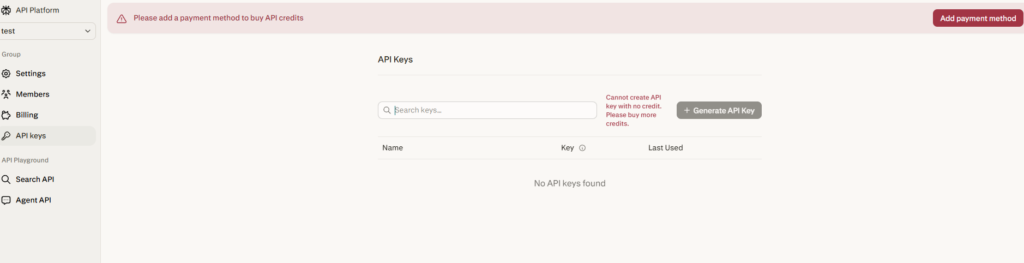
Before your API key will actually work for real calls, you need to add a credit balance to your account. Go to the billing section in the console and add a payment method.
Perplexity’s API uses a prepaid credit system — you add funds and API calls deduct from your balance based on token usage. There are no monthly minimums, no subscription fees for API access, and no expiration on credits.
Perplexity Pro subscribers receive a recurring $5 monthly API credit automatically applied to their account. For light testing and low-volume workflows, $5 goes a reasonable distance on the cheaper Sonar models. For production workloads, you will want to add a larger balance and set up budget alerts to avoid service interruptions.
Step 5: Understand the Sonar Model Family
This is where most developers make their first mistake — using the wrong model for their use case and either overpaying or underperforming. The Sonar family in 2026 has four tiers with significantly different capability and price profiles.
Sonar (sonar) is the lightweight, cost-effective search model. Best for quick factual queries, topic summaries, product comparisons, and current events where speed matters more than depth. It is fast, cheap, and includes real-time web grounding. Based on current pricing from AI Pricing Guru (synced April 26, 2026), Sonar Small Online runs at $0.20 per million input tokens and $0.20 per million output tokens. Standard Sonar Large Online is $1.00/$1.00 per million tokens.
Sonar Pro (sonar-pro) is the flagship for complex research tasks. It features a 200K token context window (versus 128K for standard Sonar), double the number of citations per response, support for multi-step queries, JSON mode, and search domain filtering. Sonar Pro runs at $3.00 per million input tokens and $15.00 per million output tokens. This is the model most developers use for production research pipelines and content automation workflows.
Sonar Reasoning Pro (sonar-reasoning-pro) is built for tasks requiring chain-of-thought reasoning — complex analyses, multi-source synthesis, and logical problem-solving. It includes web grounding plus step-by-step reasoning output. Best for tasks where the reasoning process matters as much as the answer.
Sonar Deep Research (sonar-deep-research) is the long-form synthesis model. It conducts exhaustive searches across dozens of sources to generate comprehensive reports — market analyses, literature reviews, in-depth topic coverage. It is designed for tasks where you need a finished research document, not a quick answer.
All Sonar models run on Perplexity’s fine-tuned Llama derivatives with their proprietary retrieval pipeline. The search and citations are included in the per-token price — there is no separate per-search fee on top of the token cost, which is the key cost advantage over stitching together a separate search API and LLM.
For most n8n automation workflows — daily news digests, lead research, blog research, content pipelines — start with sonar for high-volume lightweight queries and sonar-pro for anything requiring deeper research or richer citations.
Your First API Call
Perplexity’s API uses the same request format as the OpenAI API. If you have used OpenAI, you will recognize the structure immediately.
Here is a Python example:
import os from openai import OpenAI

client = OpenAI( api_key=os.environ.get("PERPLEXITY_API_KEY"), base_url="https://api.perplexity.ai" )

response = client.chat.completions.create( model="sonar-pro", messages=[ {"role": "system", "content": "You are a research assistant. Be precise and cite sources."}, {"role": "user", "content": "What are the top AI developments from this week?"} ] )
print(response.choices[0].message.content)
Here is a curl example:
curl https://api.perplexity.ai/chat/completions
-H "Authorization: Bearer YOUR_PERPLEXITY_API_KEY"
-H "Content-Type: application/json"
-d '{ "model": "sonar-pro", "messages": [ {"role": "system", "content": "Be precise and concise."}, {"role": "user", "content": "What are the latest AI news headlines today?"} ] }'
The response includes a content field with the synthesized answer and a citations array with the source URLs. This citation structure is what makes the Perplexity API uniquely valuable for factual automation — every answer traces back to a live web source you can verify or link to in your application.
The base URL is https://api.perplexity.ai — not the OpenAI URL. Everything else in the request format is OpenAI-compatible.
How to Connect Perplexity to n8n
n8n has a dedicated native Perplexity node with full built-in support. Here is the complete setup.
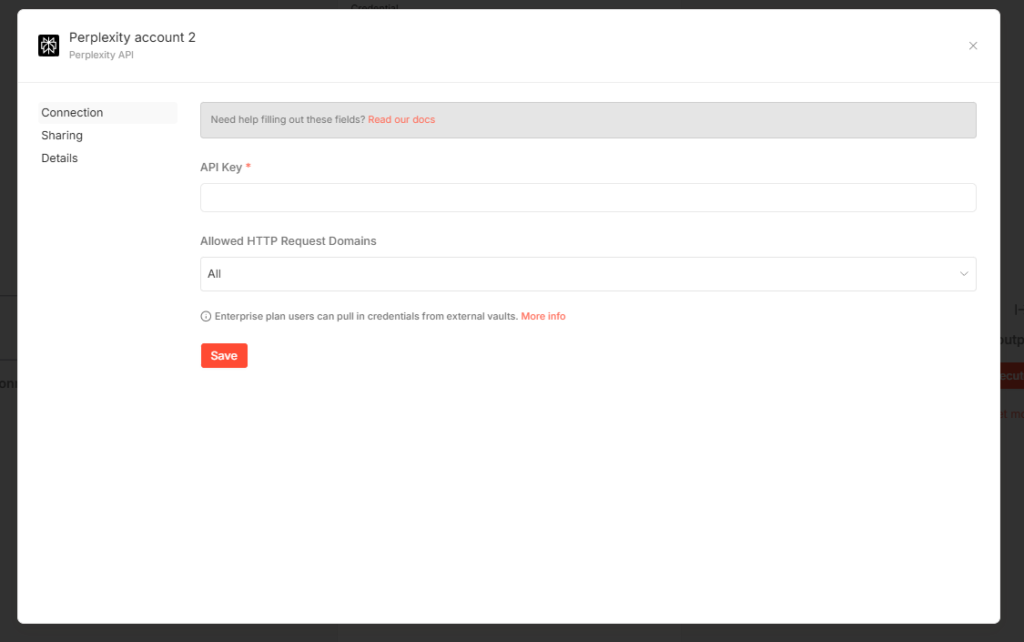
Setting up Perplexity credentials in n8n, per the official documentation at https://docs.n8n.io/integrations/builtin/credentials/perplexity/:
- In your n8n instance, go to Settings then Credentials
- Click “Add Credential”
- Search for “Perplexity” and select the Perplexity API credential type
- Paste your API key (starting with pplx-) into the API Key field
- Save the credential
The Perplexity node in n8n, documented at https://docs.n8n.io/integrations/builtin/app-nodes/n8n-nodes-langchain.perplexity/, supports the “Message a Model” operation — which lets you send a prompt to any Sonar model and receive the response directly in your workflow.
To use it in a workflow:
- Add the Perplexity node to your canvas
- Select your saved Perplexity credentials
- Choose the Operation: “Message a Model”
- Select your Model from the dropdown (sonar, sonar-pro, sonar-reasoning-pro, sonar-deep-research)
- Add your messages using the Messages section — you can add System, User, and Assistant role messages
- Connect the node output to whatever downstream step needs the research result
The node output contains the model’s response text along with the citation URLs, which you can map to downstream nodes to create links, populate a spreadsheet, send to a CMS, or pass to another AI node for further processing.
If the built-in node does not expose an operation you need, the official Perplexity documentation notes you can use n8n’s HTTP Request node with your Perplexity credential set as a Predefined Credential Type and call the API endpoint directly.
Real n8n Workflow Templates Using Perplexity
These are working templates available in n8n’s template library that use Perplexity in production-grade workflows.
Automate Daily AI News with Perplexity Sonar Pro via Telegram (https://n8n.io/workflows/5157-automate-daily-ai-news-with-perplexity-sonar-pro-via-telegram/): This workflow uses Sonar Pro to pull current AI news daily and delivers a formatted digest directly to a Telegram channel. It demonstrates the core pattern of scheduled research + formatted output delivery that you can adapt for any topic.
AI Blog Post Journalist — Perplexity for Research, Claude for Blog (https://n8n.io/workflows/5202-ai-blog-post-journalist-perplexity-for-research-anthropic-claude-for-blog/): A two-node AI pipeline where Perplexity handles the real-time research and citation gathering, then passes the sourced material to Claude for blog writing. This separation of concerns — Perplexity for current facts, Claude for prose — is the most practical pattern for content automation in 2026.
Lead Research Report Emails (https://n8n.io/workflows/6535-lead-research-report-emails/): Uses Perplexity to automatically research prospect companies, compile current information, and email research briefs — the exact use case Copy AI used to save 8 hours of research per rep per week.
Browse the full Perplexity template collection at https://n8n.io/workflows/?integrations=Perplexity for additional patterns including competitive intelligence, trend monitoring, and customer research workflows.
Perplexity API vs Google Custom Search + LLM: The Real Cost Comparison
This is the comparison that is driving developer switches in 2026.
The traditional approach for real-time AI Q&A: Google Custom Search API (or Bing Search API) for live results, then pass those results to GPT-5 or Claude for synthesis. Two API calls. Two billing accounts. Two sets of rate limits. Custom parsing code to extract and format search results before passing them to the LLM.
The cost: Google Custom Search is approximately $5 per 1,000 queries at volume. GPT-5 at $1.25/$10.00 per million tokens adds on top. A workload of 100 queries per day at typical prompt lengths costs roughly $0.50/day in search fees alone before the LLM tokens.
Sonar Large Online at $1.00/$1.00 per million tokens with web search and citations included handles the same workload for approximately $0.15/day. Sonar Pro at $3.00/$15.00 costs more per token but eliminates the infrastructure overhead and delivers richer citations in a single call.
The economic case is strongest for teams running dozens to hundreds of research queries per day. Single-query use cases are harder to justify purely on cost. But even there, the operational simplification — one API call, one billing account, one rate limit to manage, citations included automatically — often justifies the switch.
Common Errors and Fixes
401 Unauthorized
Your API key is wrong, was copied with trailing whitespace, or is invalid. Verify the full key starts with pplx-, confirm it is saved correctly in your n8n credential or .env file, and ensure the Authorization header uses the Bearer format: Authorization: Bearer pplx-yourkey.
402 Payment Required
Your account credit balance is zero or you have not added a payment method. Go to the billing section in console.perplexity.ai, add a credit card, and purchase a credit balance.
429 Too Many Requests
You have exceeded the rate limits for your account tier. The official Perplexity documentation directs you to the Rate Limits and Usage Tiers page for current limits by plan. In n8n, use a Wait node with exponential backoff before retrying, or enable the built-in “Retry on Fail” setting in the node configuration.
500 Internal Server Error
Enable “Retry on Fail” in the n8n node settings and configure 2 to 3 retries with a wait interval. Transient 500 errors on Perplexity’s side are rare but can occur during high-load periods.
Model not found
You are using a deprecated model name. The current model slugs for 2026 are: sonar, sonar-pro, sonar-reasoning-pro, and sonar-deep-research. If you are using old names like sonar-small-online or sonar-large-online from older tutorials, update to the current slugs from the official model documentation at https://docs.perplexity.ai/docs/sonar/models.
No citations in response
Citations are returned as a citations array in the API response, separate from the choices array. In n8n, map the citations field from the response JSON in addition to choices[0].message.content if you need the source URLs.
Quick Reference
Console URL: https://console.perplexity.ai/auth/login
API key format: pplx- prefix
Base URL: https://api.perplexity.ai
Chat completions endpoint: https://api.perplexity.ai/chat/completions
Official API docs: https://docs.perplexity.ai/home
Getting started guide: https://docs.perplexity.ai/docs/getting-started/overview
Pricing docs: https://docs.perplexity.ai/docs/getting-started/pricing
n8n Perplexity credentials docs: https://docs.n8n.io/integrations/builtin/credentials/perplexity/
n8n Perplexity node docs: https://docs.n8n.io/integrations/builtin/app-nodes/n8n-nodes-langchain.perplexity/
n8n template library: https://n8n.io/workflows/?integrations=Perplexity
Current Sonar model pricing (Sonar Large): $1.00/$1.00 per million tokens, search included
Current Sonar Pro pricing: $3.00/$15.00 per million tokens, 200K context, search included
Final Thoughts
The Perplexity API solves a specific but extremely common problem: getting factual, sourced, current information into your AI applications without maintaining a separate search infrastructure. The Sonar model family handles search, synthesis, and citation generation in a single OpenAI-compatible API call at a price point that is competitive with the cost of managing a separate search provider plus LLM.
Getting the key takes five minutes — account at console.perplexity.ai, navigate to API Keys, create a key, add credits. The n8n integration is simpler than most: add the credential with your pplx- key, drop the Perplexity node into your workflow, select sonar-pro, and you are making research API calls from your automation in under ten minutes.
The real value shows up in the workflows: daily news digests that are actually current, lead research reports generated automatically before sales calls, blog research pipelines that produce cited drafts instead of hallucinated summaries. These are things that were either impossible or expensive to build before search-augmented APIs made them a single node in an automation workflow.