AI Generated Apps AI Code Learning Technology
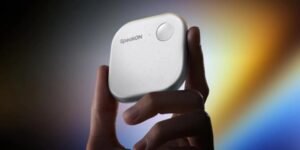
SpeakOn dictation device: A pebble-sized recorder with big ambitions
The SpeakOn dictation device arrives as a small, magnetic gadget that promises to simplify voice capture. It feels promising because it unclutters the screen and keeps the iPhone mic idle. However, the promise comes with caveats, so this introduction stays cautiously optimistic.
SpeakOn aims to make dictation feel natural. It pairs to an iPhone via MagSafe and clips on like a pebble. The design looks friendly, and the idea could fit many workflows.
Key features at a glance
- Pebble-like design that sticks to the back of an iPhone via MagSafe
- Single built-in microphone with an effective pickup range of about two feet
- Works in any app while the software keyboard is active
- Multilanguage support including English, Japanese, Korean, Simplified Chinese, Traditional Chinese, Spanish, French, German, Italian, Portuguese, Russian, and Arabic
- Battery claimed at ten hours of use and long standby, though real standby may vary
- Fast charging from zero to full in about an hour
This device shows clear potential, because it detaches dictation from the phone’s mic. Still, limitations matter. The single microphone and short pickup distance mean ambient noise affects accuracy. Also, platform limits like keyboard switching and lack of systemwide Mac support restrict use. Therefore, expect trade-offs between convenience and practicality.
Visual idea
A simple photo of the SpeakOn device attached to the back of an iPhone via MagSafe. Place the phone on a neutral background, show the pebble form and magnetic alignment, and keep the shot tight so users see scale and placement.
SpeakOn dictation device: Platform limitations and UX gaps
The SpeakOn dictation device shows clear promise, yet platform and UX limits hold it back. The device’s pebble form and MagSafe pairing feel polished. However, real use exposes friction that stops wider adoption.
Microphone pickup and ambient noise
- The device uses a single microphone and the claimed pickup range is about two feet. This short range matters in noisy settings. Consequently, ambient noise often degrades accuracy and requires users to lean in.
- Because it does not use the iPhone mic, SpeakOn avoids keeping the phone microphone active. Still, the trade-off is sensitivity loss in real environments.
- As one user asked, “Does this app work automatically?” The answer depends on app and keyboard state, which adds complexity.
Compatibility and system limits
- SpeakOn works only while the software keyboard is active. Therefore, you cannot dictate everywhere on the system.
- Many users note Mac incompatibility. One quote captures the pain: “I would have also used this device a lot more if it were compatible with Mac and I could dictate in any app.” That lack of cross-device support limits professional workflows.
- System-level keyboard switching creates additional friction. App developers cannot fully bypass OS restrictions, so background or universal dictation remains hard.
Battery, standby and real-world uptime
- SpeakOn claims ten hours of use and up to twenty days standby. However, testers reported standby lasting only a few days. Thus, expect a gap between marketing and field results.
- The device charges fast, reaching full in about an hour. Yet, users may still want configurable auto-off to save battery. As one reviewer suggested, “I would suggest tweaking that setting to make the device turn off after a few hours of inactivity to save the battery.“
UX gaps that hinder adoption
- Limited pickup distance and single mic design reduce reliability in meetings and public places.
- Keyboard-dependent operation and lack of Mac support fragment workflows for writers and professionals.
- Subscription choices and word limits add cognitive overhead for new users.
In short, SpeakOn offers a neat concept and strong features like translation and fast charging. However, developers must address mic performance, cross-platform compatibility, and system-level UX gaps. Only then will this dictation device reach widespread adoption.
SpeakOn dictation device comparison table
Below is a concise table that positions SpeakOn against other dictation tools. It highlights price, microphone approach, language reach, battery notes, and app compatibility.
| Product | Price | Microphone tech | Language support | Battery | App compatibility | Notes |
|---|---|---|---|---|---|---|
| SpeakOn | $129 device; subscription options (5,000 words/week or $12/mo unlimited) | Single onboard mic (pebble) — 2 foot pickup claim | English, Japanese, Korean, Simplified Chinese, Traditional Chinese, Spanish, French, German, Italian, Portuguese, Russian, Arabic | Claimed 10 hours use; 20 days standby claimed; field standby shorter | iPhone only; works while software keyboard is active; no Mac support | Hardware mic detaches from phone mic; short range and keyboard limits are key trade-offs |
| Wispr Flow | Varies; subscription model | Software-first; uses phone mic | Multilingual (varies by plan) | N/A for hardware; battery depends on device | App or web client | Focuses on transcription workflows; no separate hardware in most cases |
| Willow | Varies | Software or accessory dependent | Multilingual (varies) | N/A for software; hardware varies | App-based | Typically software-led, so integration depends on app permissions |
| Typeless | Varies | Software-only; uses device mic | Multilingual (varies) | N/A | App and web clients | Emphasizes editor and formatting features rather than hardware |
| Notta | Freemium to paid plans | Software-only; uses device mic | Multilingual support | N/A | App, web and plugins often available | Strong on cross-device access and meeting capture features |
| Plaud | Varies | Software-only; uses device mic | Multilingual (varies) | N/A | App and web | Focuses on AI editing and tone features |
Notes
- SpeakOn sells as hardware plus software, while most competitors remain software-first. Therefore hardware trade-offs matter.
- Software tools avoid battery issues, but they rely on the phone mic. Thus ambient noise can reduce accuracy.
- For wider adoption, SpeakOn must improve pickup range and system integration.
SpeakOn dictation device: AI editing features and user impact
SpeakOn includes AI editing that changes wording and tone after transcription. For example, the system can convert a word like complex into tricky. As a result, edits can shift intent or voice. The app also includes an attune feature that adjusts tone based on the active app. However, some users find those edits unwanted. One user said, “I don’t want or need these kinds of edits.” Still, the app lets you manually change AI editing and tone settings.
The app can auto-filter speech and format output as lists. Therefore, quick cleanups feel seamless for note takers. Because the AI edits run after capture, users retain an original transcript for review. However, automatic rewrite features demand transparency. Users need clear toggles and a visible audit trail for edits.
AI features improve clarity but add risk. For instance, subtle word swaps can alter meaning. Thus, professionals may distrust automated rewrites without controls. Also, translation features add value. SpeakOn supports many languages including English, Japanese, Korean, Simplified Chinese, Traditional Chinese, Spanish, French, German, Italian, Portuguese, Russian, and Arabic. Consequently, it has global appeal despite other UX limits.
SpeakOn dictation device: Go-to-market ideas and strategies
SpeakOn can leverage AI features, but it must prioritize user trust. Therefore, focus on opt-in editing and clear defaults. Below are tactical recommendations inspired by industry events like StrictlyVC.
- Offer transparent presets and a visible edit history so users trust changes.
- Launch a pro tier for professionals with manual-only edits and expanded Mac support.
- Demo live workflows at events like StrictlyVC to gather feedback and earn press.
- Partner with note and doc apps to reduce keyboard switching friction.
- Run a trial that highlights translation and list-formatting to show immediate value.
- Add battery-saving defaults and an inactivity auto-off to address standby complaints.
In short, AI editing can be a major differentiator. However, SpeakOn must give users control and clear defaults. If it does, adoption will likely grow among power users and teams.
Conclusion
The SpeakOn dictation device shows clear promise. Its pebble form, MagSafe pairing, and fast charging create a smooth first impression. Yet platform limits and UX gaps reduce its practical value for many users. Microphone range, ambient noise sensitivity, keyboard-dependent operation, and spotty standby times remain issues.
Despite these hurdles, SpeakOn points to where dictation can improve. Its AI editing, translation, and auto-formatting demonstrate practical gains. However, users will demand control over rewrites and better cross-device support. Therefore, the path forward includes hardware tuning, platform integrations, and clearer AI controls.
AI Generated Apps builds tools that help bridge such gaps. The company focuses on AI automation tools, AI-powered learning, and a curated AI news platform. As a result, their solutions can inform product roadmaps and improve user workflows for dictation products.
If you care about better voice capture and smarter editing, explore how these services can help. Visit AI Generated Apps at AI Generated Apps. Follow updates on Twitter, Facebook, and Instagram.
Consider testing SpeakOn for focused use cases. Meanwhile, expect steady improvements as AI and UX work converge.
Frequently Asked Questions (FAQs)
What is the SpeakOn dictation device and what does it do?
SpeakOn is a small pebble-like recorder that sticks to an iPhone via MagSafe. It uses its own single microphone and claims a pickup range of about two feet. It captures voice while the software keyboard is active.
How long does the battery last?
SpeakOn claims about 10 hours of use and 20 days standby. However, real standby has been shorter in tests. The device charges from zero to full in about an hour.
Which languages and AI features are supported?
The device can translate and transcribe many languages, including English, Japanese, Korean, Simplified Chinese, Traditional Chinese, Spanish, French, German, Italian, Portuguese, Russian, and Arabic. It also offers AI edits and a tone attune feature, which you can adjust.
What platforms and apps are compatible?
SpeakOn works on iPhone only and runs while the software keyboard is active. It does not currently offer systemwide Mac compatibility, so dictation in every app is limited.
What is the price and subscription model?
The hardware costs $129. Plans include a 5,000 words per week tier and a $12 per month unlimited words plan. Choose based on your usage and budget.