 AI Generated Apps AI Code Learning Technology
DeepSeek has quietly become the API that developers are actually switching to right now. Not because of the hype — because of the math. You get frontier-class reasoning at a fraction of what OpenAI charges, a base URL that works with every OpenAI-compatible tool you already use, and free credits just for signing up. No credit card required.
But here is the thing: despite how easy it should be, developers are still hitting walls. Wrong base URLs. 401 errors. Model names that quietly changed. And tools like Cursor, Cline, and n8n behaving strangely because the setup is just slightly different from what everyone assumes.
This guide cuts through all of that. By the end, you will have your DeepSeek API key, understand exactly which model names to use in 2026, know how to plug it into n8n with the official DeepSeek Chat Model node, and have a list of the most common errors fixed before you even hit them.
What Is the DeepSeek API and Why Are Developers Switching?
DeepSeek is a Chinese AI company that has released some of the most cost-effective large language models available today. Their API is OpenAI-compatible, which means you do not need to rewrite your existing integrations. You change a base URL and a model name, and your app is now running on DeepSeek.
The reason developers are switching right now comes down to three things:
The pricing is genuinely disruptive. DeepSeek V4 Flash costs $0.14 per million input tokens and $0.28 per million output tokens. With cache hits, that drops to $0.028 per million input tokens. Compare that to GPT-5.5, and you are looking at roughly 36 times cheaper on input. For teams running high-volume AI workloads, that difference is not marginal — it is a budget line item.
The models are legitimately good. DeepSeek V4 Pro scores 81% on SWE-bench Verified, putting it firmly in the frontier tier. DeepSeek R1 delivers o1-class reasoning at around 1/27th the cost of OpenAI’s equivalent.
And the API works with everything. Cursor, Cline, VS Code extensions, LangChain, n8n — anything built around the OpenAI API format works with DeepSeek out of the box.
Before You Start: What You Need
Getting your DeepSeek API key takes about two minutes. Here is everything you need before you begin:
- A valid email address (Google, Apple, or standard email sign-in all work)
- A phone number for verification (required for account activation)
- A browser — the process is entirely web-based at platform.deepseek.com
That is it. No credit card. No company details. No waitlist.
Step 1: Go to the DeepSeek Platform
Open your browser and navigate to:
https://platform.deepseek.com/sign_up
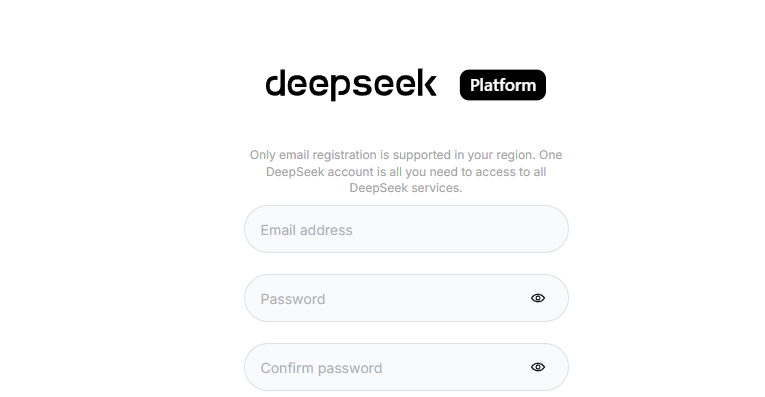
This is the official DeepSeek developer platform — separate from the chat interface at chat.deepseek.com. The chat interface is for direct use. The platform is where API keys live.
If you already have an account, go to https://platform.deepseek.com and sign in directly.
Step 2: Create Your Account
On the sign-up page, you have a few options:
- Sign up with your email address
- Continue with Google
- Continue with Apple
Choose whichever method fits your workflow. If you are setting this up for a team or a production project, using email is usually cleaner for credential management down the line.
After entering your email, you will receive a verification code. Enter that code to proceed. You will then be asked to set a password and verify your phone number. Phone verification is mandatory — enter your number, receive the SMS code, and confirm.
Once done, your account is active.
Step 3: Navigate to the API Keys Section
After logging in, you will land on the DeepSeek Platform dashboard. To create your API key:
- Look at the left sidebar navigation
- Click on “API Keys”
- You will see your API key management page
If this is a fresh account, the list will be empty. That changes in the next step.
Step 4: Generate Your API Key
On the API Keys page:
- Click the “Create new API key” button (or similar “+” button)
- Give your key a name — something descriptive like “n8n-production” or “cursor-dev” helps when you are managing multiple keys later
- Click “Create”
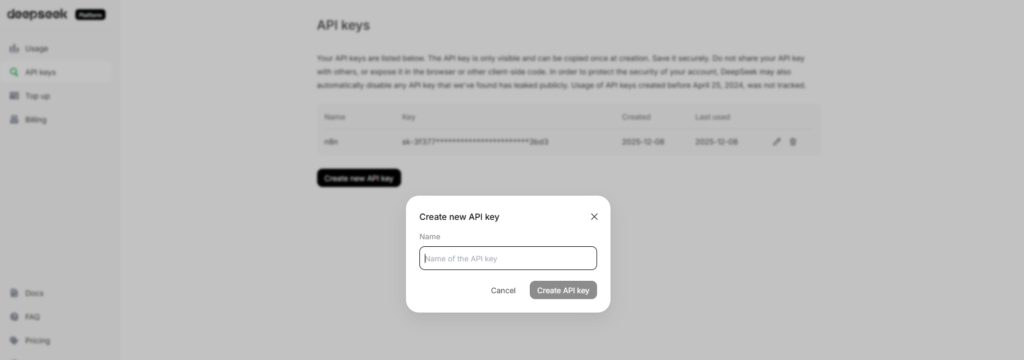
Your API key will be displayed once. Copy it immediately and store it somewhere secure — a password manager, an environment variable file, or your team’s secrets vault. DeepSeek will not show you the full key again after this screen.
Your key will look something like this:
sk-xxxxxxxxxxxxxxxxxxxxxxxxxxxxxxxx
That prefix “sk-” is the same format as OpenAI keys, which is intentional — it makes drop-in replacement easier for tools that check key format.
Step 5: Understand Your Free Credits
New DeepSeek accounts receive free promotional balance to get started — no payment method required. This free balance lets you make real API calls and test your integration before spending anything.
Once you exhaust the free credits, DeepSeek operates on a pay-as-you-go topped-up balance model. You add funds to your account, and usage is deducted from that balance. Granted balance (your free credits) is always used before your topped-up balance.
Important note: DeepSeek does not offer a permanent free API tier. The free credits are promotional and intended for getting started and validating your use case.
Step 6: Know Your Model Names (This Is Where Most People Go Wrong)
This is the part that causes the most confusion in 2026, and it is worth spending a moment on.
DeepSeek has two current production models on their API:
deepseek-v4-flash — The lower-cost flagship. Best for cost-sensitive applications and high-volume workloads. Context window of 1 million tokens, up to 384K output tokens.
deepseek-v4-pro — The premium tier. Higher capability, higher cost. Same long context window.
Here is the catch: the older model names deepseek-chat and deepseek-reasoner still work, but they are now compatibility aliases. According to the official DeepSeek API documentation, deepseek-chat corresponds to the non-thinking mode of V4 Flash, and deepseek-reasoner corresponds to the thinking mode of V4 Flash. These alias names are scheduled for deprecation on 2026/07/24.
What this means practically:
If you are writing new code or setting up a new integration today, use deepseek-v4-flash or deepseek-v4-pro directly. Do not build on the alias names.
If you have existing integrations using deepseek-chat or deepseek-reasoner, they will continue to work until July 2026, but plan to migrate.
Step 7: Your Base URL and First API Call
DeepSeek’s API is OpenAI-compatible. The two things you need to configure in any integration:
Base URL: https://api.deepseek.com
For tools that expect an OpenAI-style versioned endpoint, you can also use: https://api.deepseek.com/v1
The /v1 suffix is just for compatibility — it does not refer to any model version.
Here is a minimal Python example using the OpenAI SDK pointed at DeepSeek:
import os from openai import OpenAI

client = OpenAI( api_key=os.environ.get('DEEPSEEK_API_KEY'), base_url="https://api.deepseek.com" )

response = client.chat.completions.create( model="deepseek-v4-flash", messages=[ {"role": "system", "content": "You are a helpful assistant"}, {"role": "user", "content": "Hello"}, ], stream=False )

print(response.choices[0].message.content)
If you prefer curl:
curl https://api.deepseek.com/chat/completions
-H "Content-Type: application/json"
-H "Authorization: Bearer YOUR_API_KEY"
-d '{ "model": "deepseek-v4-flash", "messages": [ {"role": "system", "content": "You are a helpful assistant."}, {"role": "user", "content": "Hello!"} ], "stream": false }'
How to Use Your DeepSeek API Key in n8n
n8n has official native support for DeepSeek through two dedicated components: the DeepSeek credentials type and the DeepSeek Chat Model node. Here is how to connect them.
Setting Up DeepSeek Credentials in n8n
According to the official n8n documentation (https://docs.n8n.io/integrations/builtin/credentials/deepseek/), setting up DeepSeek credentials requires:
Prerequisites: A DeepSeek account and your API key (which you now have from the steps above).
Supported authentication method: API key.
To add your credentials in n8n:
- In your n8n instance, go to Credentials
- Click “Add Credential”
- Search for “DeepSeek” and select it
- Paste your API key into the API Key field
- Save the credential
Using the DeepSeek Chat Model Node
The DeepSeek Chat Model node (n8n-nodes-langchain.lmchatdeepseek) is a sub-node designed to be used as the language model input for n8n’s AI Agent and chain nodes. You can find it in n8n’s official documentation at: https://docs.n8n.io/integrations/builtin/cluster-nodes/sub-nodes/n8n-nodes-langchain.lmchatdeepseek/
To use it:
- Add an AI Agent node or Basic LLM Chain node to your workflow
- In the Language Model slot, add the “DeepSeek Chat Model” sub-node
- Connect your saved DeepSeek credentials
- Select your model (deepseek-v4-flash for most use cases)
- Configure temperature and other parameters as needed
The DeepSeek Chat Model node plugs directly into n8n’s LangChain-based AI infrastructure, meaning it works with memory nodes, tool nodes, vector stores, and all the other sub-nodes in n8n’s AI ecosystem.
DeepSeek API Pricing in 2026: What You Are Actually Paying
Here is a current overview of DeepSeek’s pricing as of April 2026:
DeepSeek V4 Flash: $0.14 per million input tokens (cache miss), $0.028 per million input tokens (cache hit), $0.28 per million output tokens.
DeepSeek V4 Pro: $1.74 per million input tokens (cache miss), $0.145 per million input tokens (cache hit), $3.48 per million output tokens. Note: V4 Pro has a limited-time 75% discount active through May 5, 2026.
DeepSeek’s context caching works automatically on repeated prefixes — you do not need to enable it or change your code. When the same prompt prefix appears again, DeepSeek serves it from cache at the dramatically reduced rate.
For comparison: DeepSeek V4 Flash at $0.14 per million input tokens is roughly 36 times cheaper than GPT-5.5 on input. For teams doing heavy AI workloads, this is not a rounding error — it is the difference between a sustainable cost structure and a runaway bill.
Always verify current pricing at the official source before committing to a budget: https://api-docs.deepseek.com/quick_start/pricing
Common Errors and How to Fix Them
These are the errors showing up constantly in developer forums and communities right now:
401 Unauthorized
This almost always means one of three things: your API key is wrong or was copied with extra whitespace, your API key has been revoked (keys can be deleted from the platform), or you forgot to include the Bearer prefix in your Authorization header. The header should always be: Authorization: Bearer sk-yourkey
Wrong base URL
Many developers mistakenly use https://api.openai.com when switching. The correct DeepSeek base URL is https://api.deepseek.com. If your tool requires the /v1 suffix to recognize it as an OpenAI-compatible endpoint, use https://api.deepseek.com/v1.
Model not found errors
If you get a model not found error, check which model name you are using. The old names deepseek-chat and deepseek-reasoner still work as aliases but can occasionally cause confusion in tools that validate model names against a hardcoded list. Switch to deepseek-v4-flash or deepseek-v4-pro to be explicit.
Rate limit errors
DeepSeek does have rate limits, but they are not announced as hard caps in the way OpenAI publishes them. For production workloads, implement standard retry logic with exponential backoff. If you need guaranteed throughput and uptime guarantees, consider routing through a third-party provider like Together AI, Fireworks AI, or OpenRouter, which offer DeepSeek models with SLA-backed infrastructure.
Capacity errors during peak hours
DeepSeek’s primary API infrastructure is hosted primarily in China. During peak demand periods — particularly when a new model launches or there is significant developer interest — you may see elevated latency or occasional capacity errors. For mission-critical production workloads, routing through a third-party provider adds a reliability layer worth considering.
DeepSeek API Key Security Best Practices
Your API key controls access to your paid account balance. Treat it with the same care as a password:
Never hardcode your API key directly in source code. Use environment variables (DEEPSEEK_API_KEY) or a secrets management tool.
Never commit your API key to a Git repository. Even private repos have breach histories. Use .gitignore to exclude .env files.
Create separate keys for separate projects or environments. If one key is compromised, you can revoke it without disrupting everything else.
Monitor your usage on the DeepSeek platform dashboard regularly. Unexpected usage spikes are often the first sign of a leaked key.
If you suspect a key has been compromised, delete it immediately from the API Keys section on the platform and generate a new one.
DeepSeek API vs OpenAI: Is It Worth Switching?
For many developers, the answer in 2026 is yes — with caveats.
The case for switching: The pricing is dramatically lower for comparable capability. The OpenAI-compatible API means your migration cost is near-zero for existing integrations. The free credits let you evaluate without any financial risk.
The caveats: DeepSeek’s direct API has less battle-tested infrastructure than OpenAI’s global network. For hobby projects and cost-sensitive workloads with tolerance for occasional reliability hiccups, the direct API is the clear winner. For mission-critical systems, consider hybrid routing or a third-party provider.
The bottom line: DeepSeek R1 offers o1-class reasoning at roughly 1/27th the cost of OpenAI’s equivalent. That ratio is hard to ignore.
Quick Reference: Everything You Need
Platform URL: https://platform.deepseek.com/sign_up
API Base URL: https://api.deepseek.com (or https://api.deepseek.com/v1 for OpenAI compatibility)
Current model names: deepseek-v4-flash (default), deepseek-v4-pro (premium)
Legacy aliases (valid until 2026/07/24): deepseek-chat (= V4 Flash non-thinking), deepseek-reasoner (= V4 Flash thinking)
Official API docs: https://api-docs.deepseek.com/
n8n credentials docs: https://docs.n8n.io/integrations/builtin/credentials/deepseek/
n8n DeepSeek Chat Model docs: https://docs.n8n.io/integrations/builtin/cluster-nodes/sub-nodes/n8n-nodes-langchain.lmchatdeepseek/
Final Thoughts
Getting your DeepSeek API key is genuinely a two-minute process once you know where to go. The signup is frictionless, the free credits mean you can start testing immediately, and the OpenAI-compatible format means there is almost no barrier to plugging it into tools you already use.
The part that trips people up is almost always the model names and base URL — especially when migrating from OpenAI-based flows. Use deepseek-v4-flash as your default model ID, point your base URL at https://api.deepseek.com, and pass your key as a Bearer token. That is the entire setup.
If you are building automation workflows in n8n specifically, the native DeepSeek Chat Model node handles everything cleanly — add your credentials once, drop the node into your AI agent workflow, and you are running DeepSeek inference inside your automation stack with no extra configuration.
The economics of this decision are clear. Whether you are building a side project or managing production AI costs, DeepSeek’s pricing makes it worth evaluating seriously in 2026.
One comment
Pingback: n8n WordPress automation Step-by-Step 2026: Publish 1 Daily AI Post with DeepSeek R1 & DALL·E 3 - AI Generated Apps